
If you’ve watched my channel for any amount of time, you know I’m a complete sucker for mixing controllers. I’ve had the SSL ones. I’ve had the Softube Console 1 system. I’ve had the Rocksolid Audio EQ controller. I had all the Avid Eucon controllers when I was an exclusive Pro Tools user. I’ve had them all.
There’s a reason I keep buying them. Partly, I’m a psycho. But mostly, none of them ever do everything I want. I do think I’ve finally landed on a setup that works for me, and I’ll show you that at the end. First, here are the real pros and cons of each ecosystem, from someone who has mixed records on all of them.
Quick Comparison
| Controller | Best at | Biggest drawback |
|---|---|---|
| SSL UF1 | Fader, transport and customizable keys | Still runs on the 20+ year old Mackie MCU protocol |
| SSL UC1 | Hands-on EQ, with third-party plugins via SSL 360 Link | Locked to an SSL layout, and a big bus compressor section |
| Softube Console 1 | The most premium feel and the best EQ/compressor layout | Limited third-party support, and those plugins can break recall after updates |
| Nektar CS12 | Any third-party plugin, no wrapper needed | Cheaper build, and no Pro Tools or Ableton support yet |
The SSL System: UF1, UC1 and UF8
SSL’s lineup includes the UF1, the UC1 and the UF8, which is basically eight faders. I’m not a big fader guy. Some of my friends are, so if you like mixing on eight or twelve or a hundred faders, the UF8 can be helpful. I’m more of a one-fader guy.
SSL UF1
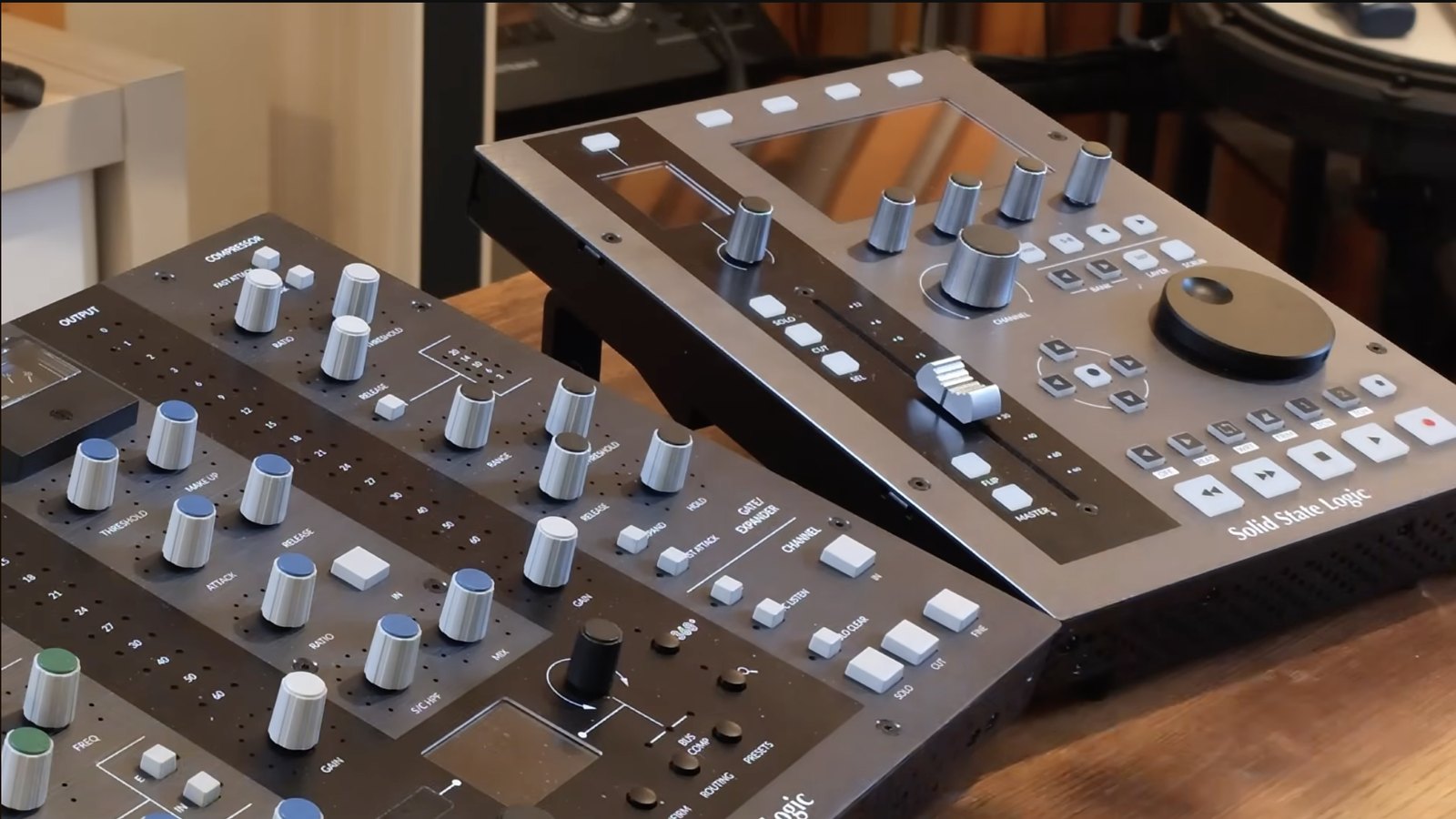
The UF1 is probably one of my favorite controllers ever made. (I went deep on it in my full SSL UF1 review.)
- Transport control. Not strictly necessary, since you have a spacebar, but I do use it with this box.
- Programmable keys and a lot of customization. You can set up sends or plugins on it.
- One of the best faders out there, with cut, solo and pan buttons placed where they’re easy to hit. I’ve got fat fingers, so that matters.
- The big jog wheel I don’t find useful at all.
My main gripe: it still runs on the Mackie MCU protocol, which is literally over 20 years old. I don’t know why these companies can’t get together on a new protocol so all this stuff works together better.
SSL UC1
The UC1 is a great EQ controller. It’s built around SSL’s own plugins, but to SSL’s credit, they released SSL 360 Link, which lets you use third-party plugins with it for both the EQ and the bus compressor. So if you’re a fan of Plugin Alliance’s SSL channel, for example, you can set the UC1 up to control that instead.
The catch is you’re limited to an SSL configuration. There are only two frequency controls in the high end and you can’t change the Q, so whatever EQ you use has to fit that layout. Same with the compressor and gate: you only get three compressor knobs, so you have to pick which parameters you care about.
My other big complaint is the bus compressor section. If you use an SSL bus compressor on your mix bus, you’re in luck. I don’t. So about 40% of this big box is dedicated to something I don’t use, and it’s just sitting in the way on my desk. An EQ-only version would fit my setup much better.
Why I Don’t Trust Plugin Wrappers
This isn’t just an SSL problem. It’s a problem with wrappers in general, and it’s the most important thing in this whole comparison.
I used the UC1 with SSL 360 Link on a pretty big project, running the Waves CLA MixHub SSL EQ inside the wrapper. I finished the mixes, sent them out, and the album came out great. Later the artist needed show versions. I brought the mixes back up and, because of some software update compatibility issue, the wrapper wouldn’t load. All the drum settings were gone. I couldn’t recall them, and I had to do some crazy math to get the mixes back. It was a disaster.
In SSL’s defense, they’ve since released an update that fixed that issue with Waves. But this is why I don’t like running third-party plugins inside another company’s wrapper. A lot can go wrong. Maybe not today, but two or three years down the line, when you reopen a session, you don’t know how the software or the compatibility will have changed.
So my rule: if I’m using SSL hardware, I use SSL plugins with it and stay away from the Link stuff.
This matters more than people think. Clients come back for show versions and instrumentals, sometimes long after the album is out. A session I can’t recall exactly is a real problem, which is why I’m so careful about recall on client mixes.
Free Download
Want a better starting point for your vocals?
Grab my free vocal preset and hear the difference on your next session.
Softube Console 1
To me, the Console 1 system is the most premium of the bunch. It feels great, and I love the layout:
- EQ laid out perfectly: quick low cut and high cut, plus four bands, all with Q. Pretty much any EQ can work with it.
- Compressor on the right with attack, release, ratio and threshold.
- Character and Drive, which sound great, plus mute, solo and volume.
- The faders are beautiful, and the LEDs are the best out there. You can do sends, volume and pan from them.
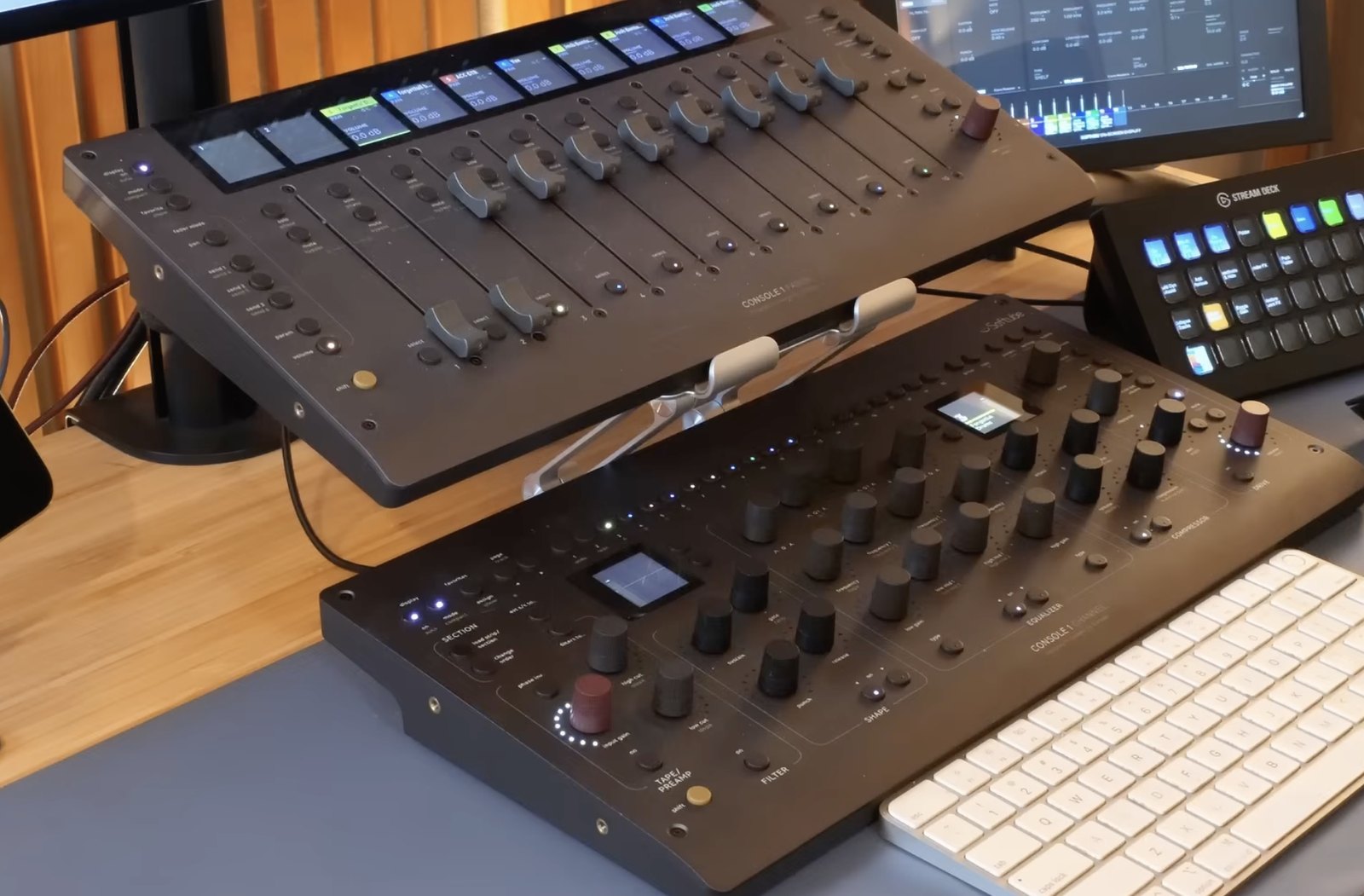
One small thing: the mute button sits right where a fader usually is, and with my fat fingers it’s sometimes hard to hit it without bumping the fader. Not a big deal, just something I notice.
DAW Integration
It works pretty well for me. In Studio One, though, I have to put the Console 1 plugin on every track I want to control, which is a bit of a pain. In Cubase, Logic and a few others, you don’t need the plugin on a track just to get fader, solo and mute, which is huge. I hope Studio Pro gets that feature. In Pro Tools it works fairly well. It’s not perfect, but Pro Tools has probably been the number one offender at not letting other companies use its protocol, and in its defense, it’s getting a lot better.
Third-Party Plugins
Console 1 supports some third-party plugins. The ones I know work are UAD, Plugin Alliance and FabFilter, and they work pretty well. You can load a FabFilter EQ or a Plugin Alliance compressor right onto the Console 1.
But once again, I had a UAD 1176 set up on it, went to recall a mix one day, and it wasn’t working because of a software update compatibility issue. Take the third-party plugins away and just use Softube’s own plugins, and I think this thing works fantastically.
Nektar CS12
The newest one on the block. First, the bad news: it doesn’t work with Pro Tools or Ableton yet, so if you’re on either of those, sorry. It just got Studio Pro support, and it supports Reaper too.
Here’s why it’s interesting. To me, this is the closest we’ve gotten to what most of us actually want: use any third-party plugin you want, without a wrapper.
- The basics: transport, a button to open and close the latest plugin, a mixer button, solo, mute, select, a fader and a pan knob.
- Per-channel plugin buttons: with two plugins on a channel, one button brings up the first and the other brings up the second.
- Custom mapping: you can map just the knobs you actually use. On a lot of plugins I’m only touching three or four controls. On a multiband I’ve got the thresholds, a crossover and input and output. On my 1176 it’s input, output, attack and release. The screen tells you what each knob does.
The downsides are on the hardware side. It’s the cheapest of them all, and you can feel it. The plastic is cheaper, and the fader works fine but isn’t as nice as the Console 1 or SSL faders. The knob labels also show up on your computer screen rather than on the unit itself. I’d love to see a premium version someday with a better fader and a little display under each knob. That said, glancing over at the screen isn’t that far off.
Mixing & Mastering
Want a pro mix and master?
One engineer handles everything, start to finish. Credits include A$AP Rocky, Kelly Clarkson and Travis Barker.
The Controller Setup I Use Now
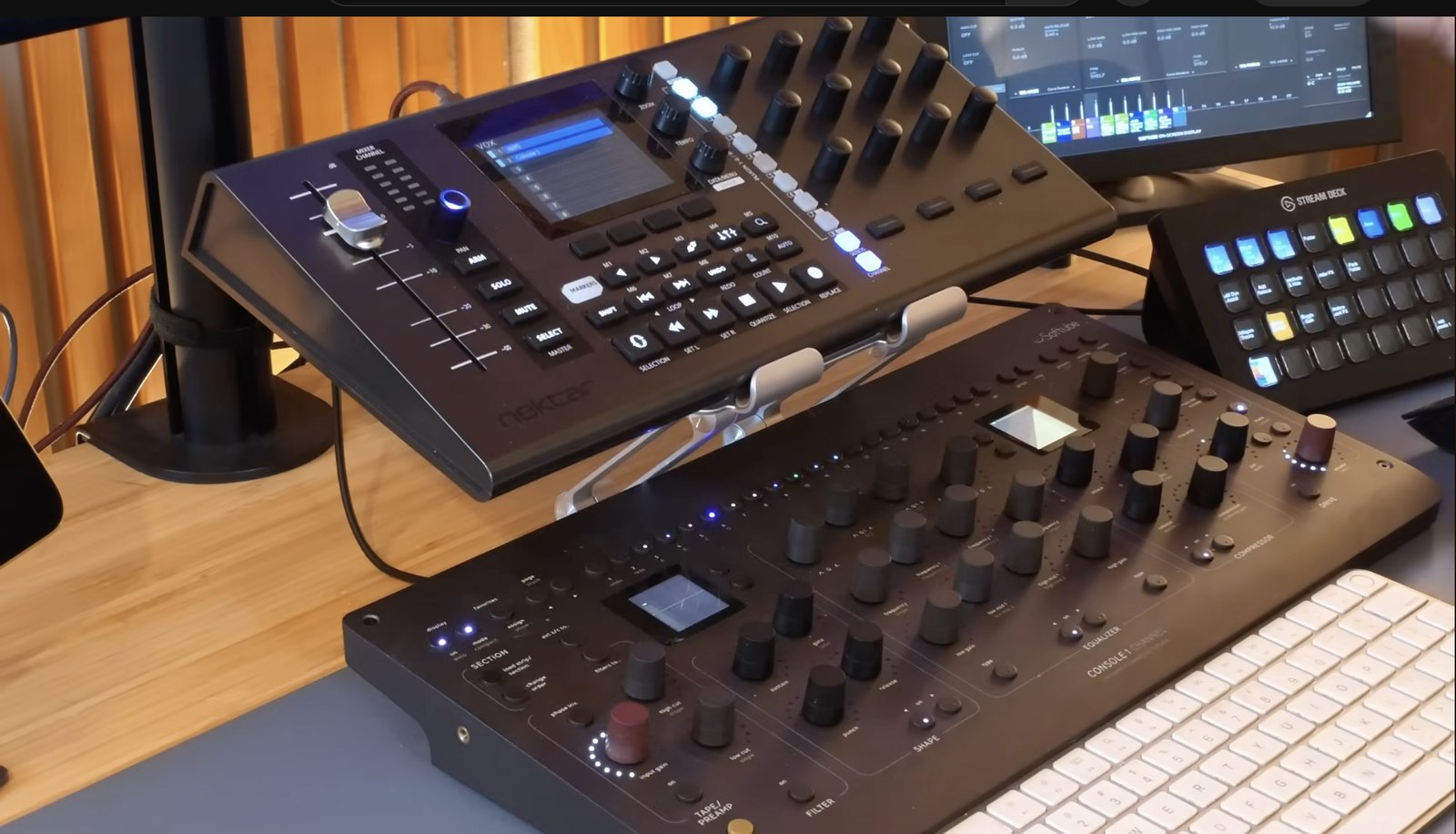
I actually tried the Nektar by itself for a while and really enjoyed it. But after so long on the Console 1, I’m used to clicking a track and just reaching for a low cut, a high gain or the compressor, and it just works. So the Console 1 is still my main unit.
The CS12 now sits where my SSL UF1 used to. It handles the fader, the transport and my metronome button, and it’s connected with Fender Studio Pro much better. The other great part: plugins that don’t work with Softube come up on the Nektar. Between the two, I can control basically a whole session from controllers. I still use the mouse, obviously, but this little system is working really well.
Which Mixing Controller Should You Buy?
- Pro Tools user: Avid’s Eucon hardware is probably your best bet. It works so well with Pro Tools. When I was exclusively on Pro Tools, it was a great system.
- Want the best feel and layout: Softube Console 1, ideally with Softube’s own plugins.
- Want a great single fader and transport: SSL UF1.
- Want any third-party plugin without a wrapper: Nektar CS12, if your DAW is supported.
An honorable mention goes to the Rocksolid Audio controller. It has a MIDI mode and a host mode, but host mode is a wrapper again, and if you have mixes you might need to open three years from now, wrappers just make me nervous.
Common Questions About Mixing Controllers
What’s the best mixing controller?
It depends on your DAW and your plugins. For me, it’s a Softube Console 1 as the main unit paired with a Nektar CS12 for the fader, transport and third-party plugins.
What is a plugin wrapper, and why avoid it?
A wrapper is a host plugin from one company that loads another company’s plugin inside it so their hardware can control it. It works until a software update breaks compatibility. Then you may not be able to recall your settings when you reopen an old session.
Does the Nektar CS12 work with Pro Tools?
Not when I made this comparison. It didn’t support Pro Tools or Ableton yet, but it did support Studio Pro and Reaper.
Do you still need a mouse with a mixing controller?
Yes. Even with a full controller setup I still use the mouse. The point of a controller is to make common moves faster and keep you listening instead of staring at the screen.
Key Takeaways
- The SSL UF1 has one of the best faders, but it runs on a protocol that’s over 20 years old
- The SSL UC1 is a great EQ controller, but it’s locked to an SSL layout
- Console 1 feels the most premium and works best with Softube’s own plugins
- The Nektar CS12 controls any third-party plugin without a wrapper, but the build is cheaper
- Wrappers can break recall years later, so be careful using them on client work
What’s your favorite controller? Let me know in the comments. If you’re looking at Softube’s newest box, check out my Softube Flow controller review. And as always, if you need your songs mixed or mastered, hit me up here.