

Let me be clear upfront: this isn’t a “Melodyne sucks” article. Melodyne is legendary. It’s been the industry standard for vocal pitch correction for years, and I’ve used it on countless records. But over the last month, I’ve found myself reaching for a new plugin called Vovious more and more—and it’s not just because it’s $470 cheaper.
If you’re a producer, mixing engineer, or vocalist looking for professional vocal tuning software, this review will show you exactly what makes Vovious different, how it compares to Melodyne, and whether it’s the right choice for your workflow.
Quick Summary: Is Vovious Worth It?
- Price: $229 vs Melodyne Studio’s $699
- Sound Quality: Matches or exceeds Melodyne in natural-sounding corrections
- Workflow: Faster and more intuitive with color-coded pitch visualization
- Best For: Vocal tuning, rap/hip-hop production, clean recordings
- Not Ideal For: Polyphonic material (Melodyne Studio still wins here)
What is Vovious? The Basics
Vovious is a relatively new pitch correction and vocal tuning plugin from German developers DoublePi Technologies. Released in December 2025, it uses neural network technology for pitch detection and a proprietary algorithm that separates vocal overtones from the fundamental pitch—which is the key to why it sounds so natural.
Unlike Melodyne’s tiered pricing structure (Essential, Assistant, Editor, Studio), Vovious gives you everything in one package for $229. No upsells, no feature limitations, no wondering if you should’ve bought the more expensive version.
Key Features at a Glance
- Neural network pitch detection (processed locally, no cloud)
- Color-coded pitch deviation visualization
- Independent control over pitch, formants, vibrato, and sibilants
- Pitch drawing mode for manual corrections
- Temporary note mode for micro-level edits
- Timing editor with visual beat alignment
- Harmony mode for creating vocal stacks
- Multi-track editing in a single window
- ARA2 integration for seamless DAW workflow
- 30-day free trial (no credit card required)
Sound Quality: The Most Important Test
Here’s the truth: if a pitch correction plugin doesn’t sound good, nothing else matters. The interface could be gorgeous, the workflow could be lightning-fast, but if your vocals sound robotic or processed, it’s useless.
Vovious passes this test with flying colors.
In my testing with various vocal styles—from clean R&B vocals to rap performances—Vovious produced corrections that were just as transparent as Melodyne, and in some cases, I preferred the sound. The neural network pitch detection accurately identifies notes even in fast passages, and the overtone separation technology means you can make aggressive pitch shifts without the dreaded “chipmunk effect.”
Real-World Example: Before and After
In the video demonstration, I worked with a track from artist Kagan. The vocals had autotune as part of the original sound, so for this test, I turned it off to show Vovious in action. The corrections were subtle but effective:
- Slightly flat notes were brought into pitch without sounding processed
- Natural vibrato was preserved and even enhanced where needed
- Transitions between notes remained smooth and musical
The key difference I noticed: Vovious seemed to better preserve the character of the original performance while still making the necessary corrections. It doesn’t sound like tuning—it sounds like a better take.
Workflow: Why I Actually Prefer Using Vovious
Sound quality got Vovious through the door, but workflow is what made me stay. And honestly, this is where Vovious really shines compared to Melodyne.
1. Color-Coded Pitch Visualization
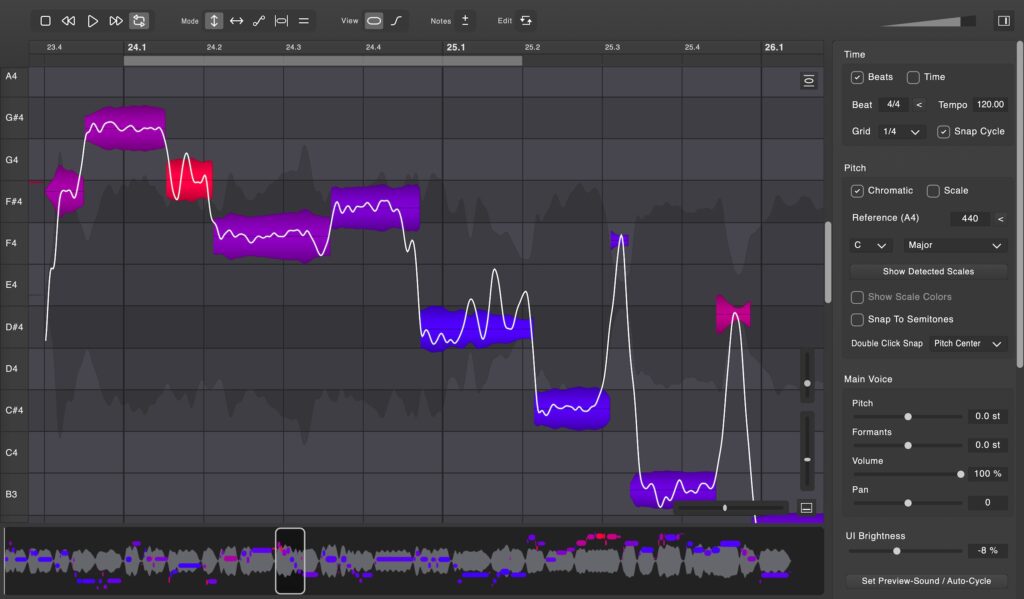
This is the first thing you notice when Vovious opens: it’s colorful. And those colors aren’t just pretty—they’re functional.
- Blue = perfectly in tune
- Purple = close to correct pitch
- Red = significantly out of tune
Compare this to Melodyne’s interface, which looks like it hasn’t been updated since the early 2000s. Gray background, minimal visual feedback, and you have to click on each note to see how many cents it’s sharp or flat.
With Vovious, I can scan through an entire vocal track and immediately see which notes need attention. It’s dramatically faster.
2. The Universal View
The universal view at the bottom of the screen acts like an intelligent scrollbar. Yes, Melodyne has something similar, but Vovious’s implementation is more responsive and useful.
You can quickly see where the problem areas are (red notes stand out), jump to them instantly, make your corrections, and move on. For long vocal tracks, this saves considerable time.
3. Preview Mode
Here’s a workflow feature I didn’t know I needed until I had it: the ability to preview individual notes in isolation.
In ARA mode with most DAWs, you can’t solo just the note you’re working on. This becomes an issue when you have fast passages with closely-spaced notes. Sometimes I’d think I was tuning one note, only to realize I was actually adjusting the wrong one.
Vovious solves this with a simple headphone icon. Click it, and you hear just that note. It’s such a small thing, but it makes precision editing so much easier.
4. Sibilance Editing
Vovious automatically detects sibilant regions (s, sh, t sounds) and marks them as darker areas in the waveform. You can then adjust the amplitude of just those sibilants without affecting the rest of the note.
This is huge for getting clean, professional-sounding vocals. Instead of running a separate de-esser, you can handle sibilance right in Vovious as part of your tuning workflow. It’s more surgical and musical than most de-essers.
What Vovious Does Better Than Melodyne
After extensive use, here are the areas where I genuinely believe Vovious outperforms Melodyne:
1. Visual Design and User Experience
It’s not just about looking pretty. The color-coded visualization, clean typography, and thoughtful layout make Vovious more intuitive and faster to use. The learning curve is gentler, and once you’re proficient, you can work faster.
2. Speed of Operation
Between the universal view, color coding, and streamlined controls, I can tune a typical vocal track in Vovious in roughly 60-70% of the time it would take me in Melodyne. That adds up over the course of multiple projects.
3. Vibrato Control
The independent vibrato slider on each note is fantastic. You can smooth out uneven vibrato, add vibrato where there isn’t any, or completely remove it to create a straighter, more modern sound. Melodyne can do this too, but Vovious makes it more accessible and visual.
4. Pricing and Value
One license, $229, everything included. Melodyne Studio costs $699, and to get there you might have bought Essential ($99), upgraded to Assistant ($149), then Editor ($399), before finally reaching Studio. Vovious’s single-tier pricing is refreshingly simple and fair.
Where Melodyne Still Has the Edge
To be completely fair, there are areas where Melodyne remains superior:
1. Polyphonic Material
Melodyne Studio can edit polyphonic audio—meaning you can tune individual notes within chords or correct pitch on instruments like piano or guitar. Vovious is designed for monophonic sources (single-note melodies), so if you need to edit polyphonic material, Melodyne is still the only real option.
2. Established Track Record
Melodyne has been around since 2001. It’s battle-tested, stable, and has a massive user base. Vovious launched in December 2025, so it’s very new. While I haven’t experienced any crashes or bugs, long-term stability and development trajectory remain to be seen.
3. Integration Ecosystem
Melodyne has deep integration with DAWs and is often bundled with professional recording software. Vovious works great as an ARA plugin, but it doesn’t yet have the same ecosystem presence.
Who Should Buy Vovious?
Vovious is ideal for:
- Vocal producers and engineers who primarily work with sung or rapped vocals
- Budget-conscious professionals who want pro-level results without the Melodyne price tag
- Engineers who value workflow efficiency and find Melodyne tedious
- Hip-hop and pop producers where transparent vocal tuning is essential
- Home studio owners looking for their first professional pitch correction plugin
Melodyne might be better if:
- You regularly edit polyphonic material (chords, piano, guitar)
- You’re deeply invested in the Melodyne ecosystem and workflow
- You need the most established, proven solution with the longest track record
Technical Details: What You Need to Know
Key Modes Explained
- Pitch/Amplitude Mode (1): Standard tuning mode with pitch, formant, vibrato, and volume controls
- Timing Mode (2): Adjust note timing and length to align with the beat
- Pitch Drawing Mode (3): Freehand draw pitch curves for creative corrections
- Temporary Note Mode (4): Make micro-level adjustments to specific parts of a note
- Harmony Mode (5): Create harmony voices and vocal stacks
Pro tip: The modes are mapped to keyboard shortcuts 1-5 for fast switching.
Tips for Getting the Best Results
After working with Vovious extensively, here are my recommendations:
1. Feed It Clean Recordings
Like all pitch correction plugins, Vovious works best on clean vocal recordings without heavy effects or echo. Record dry vocals, tune them in Vovious, then add reverb, delay, and other effects afterward.
2. Don’t Rely on Auto Pitch Correction
Yes, Vovious has an automatic pitch correction feature, but I rarely use it at 100%. Automatic tuning tends to sound robotic because it corrects everything, including intentional bends and slides.
Instead, I might use it at 20% to catch the worst offenders, then manually tune the rest. This preserves the performance’s character while still getting professional results.
3. Use Scale Mode
Set your key and scale in the sidebar. Vovious will show you which notes belong to the scale (brighter) and which don’t (darker). This makes it much easier to identify wrong notes versus intentional passing tones.
4. Master the Temporary Note Mode
This mode (shortcut: 4) is perfect for fine-tuning specific parts of a note. If the beginning of a note is slightly flat but the rest is good, you can use temporary note mode to adjust just that section without affecting the entire note.
Pricing Breakdown: Vovious vs Melodyne
Let’s talk numbers, because the price difference is significant:
| Plugin | Price | Features |
|---|---|---|
| Vovious | $229 | Everything included |
| Melodyne Essential | $99 | Basic pitch editing |
| Melodyne Assistant | $249 | Vocal tuning tools |
| Melodyne Editor | $399 | Advanced editing |
| Melodyne Studio | $699 | Full suite + polyphonic |
The value proposition is clear: For monophonic vocal work, you’re getting professional-grade results for $470 less than Melodyne Studio, or even $20 less than Melodyne Assistant.
Common Questions About Vovious
Does Vovious work with my DAW?
Vovious supports VST3, AU, AAX, and ARA2, so it works with virtually all major DAWs including Pro Tools, Logic Pro, Ableton Live, FL Studio, Cubase, Studio One, and Reaper. For the best workflow, use it in ARA mode if your DAW supports it.
Is there a free trial?
Yes! Vovious offers a fully functional 30-day free trial. No credit card required. This is the best way to test if it fits your workflow before buying.
Can I use Vovious on rap vocals?
Absolutely. In fact, rap and hip-hop vocals are where Vovious excels. The fast note detection and transparent corrections are perfect for modern vocal production. Just remember to turn off heavy autotune or effects before tuning.
Will Vovious make my vocals sound robotic?
Only if you want them to. The key is manual tuning rather than relying on the automatic correction. When used properly, Vovious produces corrections that are completely transparent—listeners won’t know you tuned the vocal at all.
How many computers can I install it on?
Your license includes 2 activations, so you can install Vovious on your desktop and laptop, for example.
My Final Verdict: Should You Switch?
After a month of using Vovious in real-world production work, here’s my honest assessment:
For vocal-focused producers and engineers, Vovious is genuinely better than Melodyne in day-to-day workflow.
The sound quality matches Melodyne. The workflow is faster and more intuitive. The interface is dramatically better. And it costs $470 less than Melodyne Studio.
Does this mean Melodyne is obsolete? No. If you need polyphonic editing or you’re already deeply invested in Melodyne’s ecosystem, stick with it. But for the majority of engineers who spend their time tuning vocals, Vovious is a legitimate alternative that might actually work better for you.
The fact that it’s from a small German startup rather than an industry giant doesn’t concern me—the 30-day trial lets you fully evaluate it before committing, and the quality speaks for itself.
My Recommendation:
Download the free trial. Spend a few hours with it. Compare it directly to whatever you’re currently using. I think you’ll be impressed, just like I was.
Need Professional Mixing and Mastering?
Whether you decide to tune your own vocals or leave it to the professionals, I offer complete mixing and mastering services at mixandmastermysong.com. I use tools like Vovious (and yes, still Melodyne when appropriate) to deliver radio-ready results.
Plus, when you visit, you can download my free vocal preset to get started with better vocal sounds right away.
Key Takeaways
- Vovious costs $229 vs Melodyne Studio’s $699—a $470 difference
- Sound quality is on par with Melodyne for monophonic vocal tuning
- Color-coded pitch visualization makes workflow significantly faster
- Neural network pitch detection provides accurate note recognition
- Unique features include sibilance editing, temporary note mode, and harmony creation
- 30-day free trial available to test before buying
- Best for vocal tuning; Melodyne still superior for polyphonic material
- Single-tier pricing means you get all features with one purchase
Have you tried Vovious yet? Are you sticking with Melodyne or considering the switch? Drop your thoughts in the comments below—I’d love to hear about your experience.
And as always, if you need professional mixing or mastering, visit mixandmastermysong.com to work with me directly.