

Sima is a clipper built for mastering, and since it came out this summer it has ended up on about 90% of the masters that leave my room. It works on a drum bus too, which I’ll get to. I bought it myself, and I don’t make anything if you buy it.
Here’s what it is, the controls I actually touch, and what it did on two songs I mixed and mastered recently.
What Sima is
Sima is made by Hacienda Audio, the plugin side of mastering engineer Matt Davis’s studio. If you’ve spent any time on audio forums, you’ve probably seen Matt’s posts. There’s a lot of nonsense on those forums, but when Matt writes about mastering, I pay attention. That’s the reason I tried this plugin at all.
Like a lot of recent clippers, Sima is going after the sound of the Lavry Gold, a converter mastering engineers have used for years. A converter like that clips the signal slightly: you get more loudness, you lose a little of the transient, and you get a saturation people have grown to love. What I like most about Sima is that it gets things loud without making them too bright.
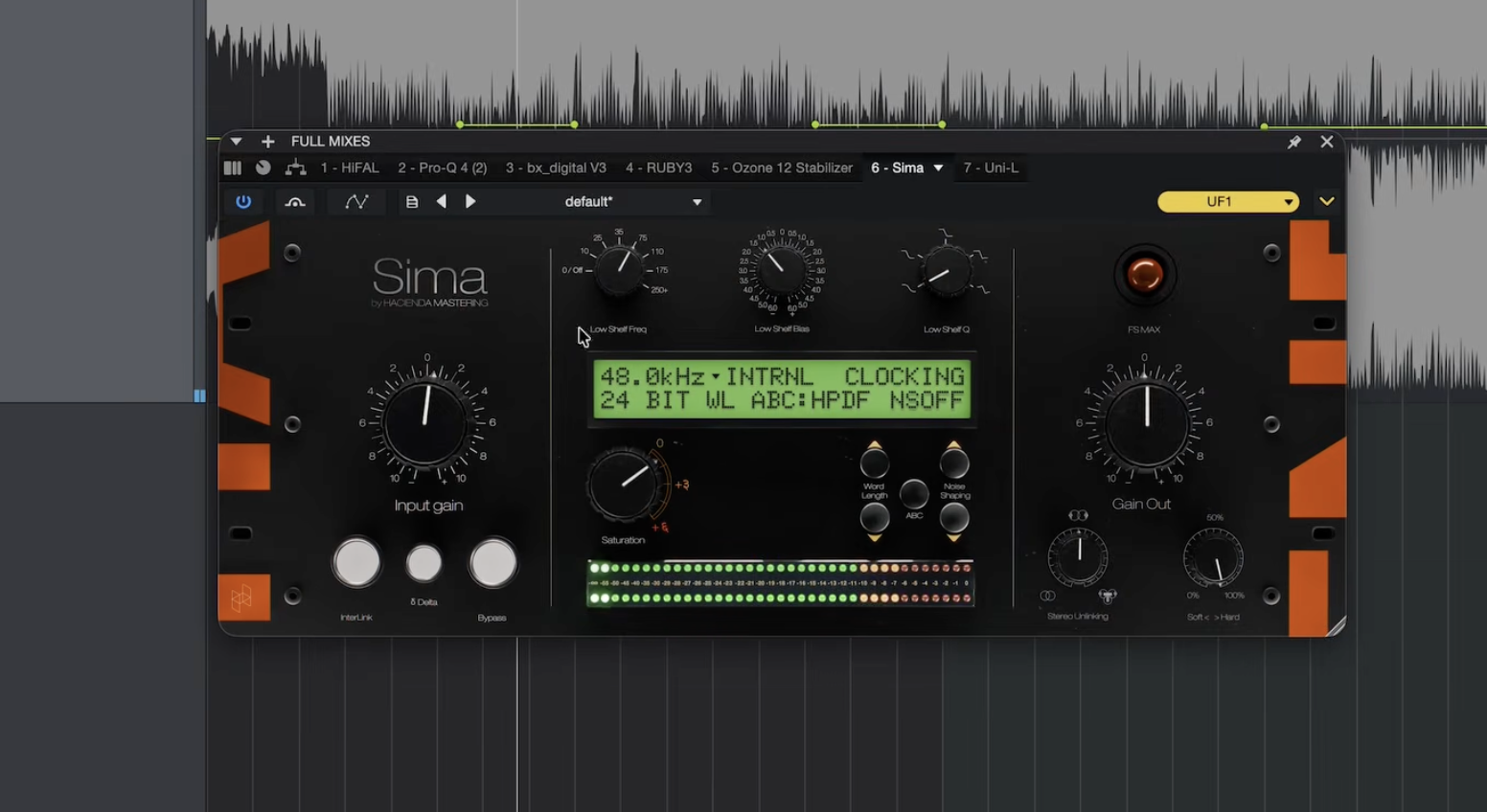
The controls I actually use
Sima goes deep, and I’m not going to cover every knob. Hover over any control and a tooltip tells you what it does, which helps a lot when you forget. These are the ones that matter to me.
Input and output
Input is how hard you hit the clipper. Gain out sets the level after it. Sometimes I use the output to feed a limiter, but most days I don’t need a limiter after Sima at all.
Saturation
Clipping brings things forward. The saturation is what makes it exciting and energetic. Turn it all the way down for clean clipping, or dial in as much as the song can take. Being able to choose exactly how much goes on a master or a mix is a big part of why I like it.
Low shelf bias
This is the control I find most useful, and you don’t see it on many clippers. When you clip a master, the bass usually distorts first because it carries the most energy. Turning the low shelf bias down pulls low end out before the clipper and puts it back after, so the bass gets clipped less but nothing goes missing on the way out. Think of it as a shelf cut before the clipper that gets reintroduced on the other side. With the pop and hip hop I work on, it’s how I keep the kick and 808 from breaking up.
Stereo unlinking
I run it at 200%, which means the left and right channels clip independently, the way the hardware works. The master gets a little wider, which I like. Hacienda keeps the low end phase coherent at every setting, so it stays safe in mono.
Soft and hard clipping
This knob morphs between two clipping curves. I’ve left it at 100 for almost everything and it works fine for me.
Hearing what it’s doing
Engage Interlink and Delta together and you hear only what Sima is adding. It’s the fastest way to tell whether it’s helping or just distorting. Interlink on its own matches the level as you push the input, so louder doesn’t fool you into thinking it’s better.
That’s the basics. Matt’s own walkthrough on the Hacienda site breaks down everything else.
Professional Mastering
Need your song mastered?
Stereo mastering from $70 a song, done by me. Apple Digital Masters certified.
What it did on two real masters
The first was a song by John Banton that I mixed and mastered. I kept pushing Sima until it sat around -7.5 LUFS, which is plenty loud. Level matched against the unclipped version, it kept almost all of the transient punch, and the saturation made the clipped version sound better than the original. That almost never happens with clipping or limiting.
The second was “Fever” by Anjail, another song I mixed and mastered. This one got crunchy faster, so I brought the saturation down and turned the low shelf bias down until the kick stopped distorting. It landed around -8.3 LUFS with a little warmth still in it. On that song I’d probably add a limiter after for the last bit of level, but Sima did most of the work.
If you’re wondering why I’m not aiming for -14 LUFS, here’s why the hits don’t either.
Sima on the drum bus
It’s not just a mastering tool. If your drums are pushing your master too hard, Sima on the drum bus shaves a little off the transients, and the saturation adds a nice flavor on the way. If you’re new to clipping in general, start with how to use clipping in mastering for loudness, or see how two cheaper options compare in Orange Clipper vs FL Clipper.
Is Sima worth it?
At the time of writing, Sima is $150 for a perpetual license at its introductory price, or $12.50 a month for 12 months on a rent-to-own plan. It runs as AU and VST3 on Mac and Windows, and AAX on Mac.
For me it’s been worth it. It gets a master loud fast, the low shelf bias solves the problem I fight most with clippers, and it translates well everywhere I’ve played it. A clipper won’t fix a mix that isn’t working, though. If the mix is the problem, no plugin on the master will save it.
Have you tried Sima yet? Let me know in the comments. And if you’d rather have your song finished by someone who does this every day, that’s what my mixing and mastering services are for.