

Online mastering has been around longer than the word “AI” has been attached to it. LANDR launched in 2014. I tried these platforms years ago, decided they were not good, and then mostly stopped paying attention.
That was a while ago. So I ran the test properly.
I mastered a song myself. Then I ran the same mix through LANDR and through Waves Online Mastering. My wife labeled the three files A, B and C so I did not know which was which. I listened, picked a favorite, said why, and only then looked at the answer key.
I also wanted eMastered in there. It wanted $40 to export a file. I passed.
Below is the full test, the measurements, what each master actually did to the track, and then a plugin-by-plugin walkthrough of my own chain so you can see the decisions rather than just the result.
How the test was run
Three things matter if a comparison like this is going to mean anything.
Level matching. Loud sounds better. If you A/B two masters at different volumes, the louder one wins every time and you have learned nothing. I used Loudness Penalty to match all three files to the same perceived level. It is normally used to check whether your song is over the Spotify or Apple Music thresholds, which I do not pay much attention to, but it is very good at this.
Blind labeling. I did not label the files. Somebody else did. I have a sound I like, so if I know which one is mine, I am going to pick it.
Same starting mix. All three services got the identical stereo mix. No cherry-picking, no separate revision passes.
The song is one I worked on with Angel, a genuinely talented singer and musician. Go listen to her stuff.
What the meters said before I listened
The measurements were the first interesting part.
| Master | Integrated loudness | True peak | Loudness range |
|---|---|---|---|
| Master A | -8.3 LUFS | +0.1 dB | 2.0 |
| Master B | -8.4 LUFS | +2.0 dB | 2.0 |
| Master C | -8.0 LUFS | -0.2 dB | 1.8 |
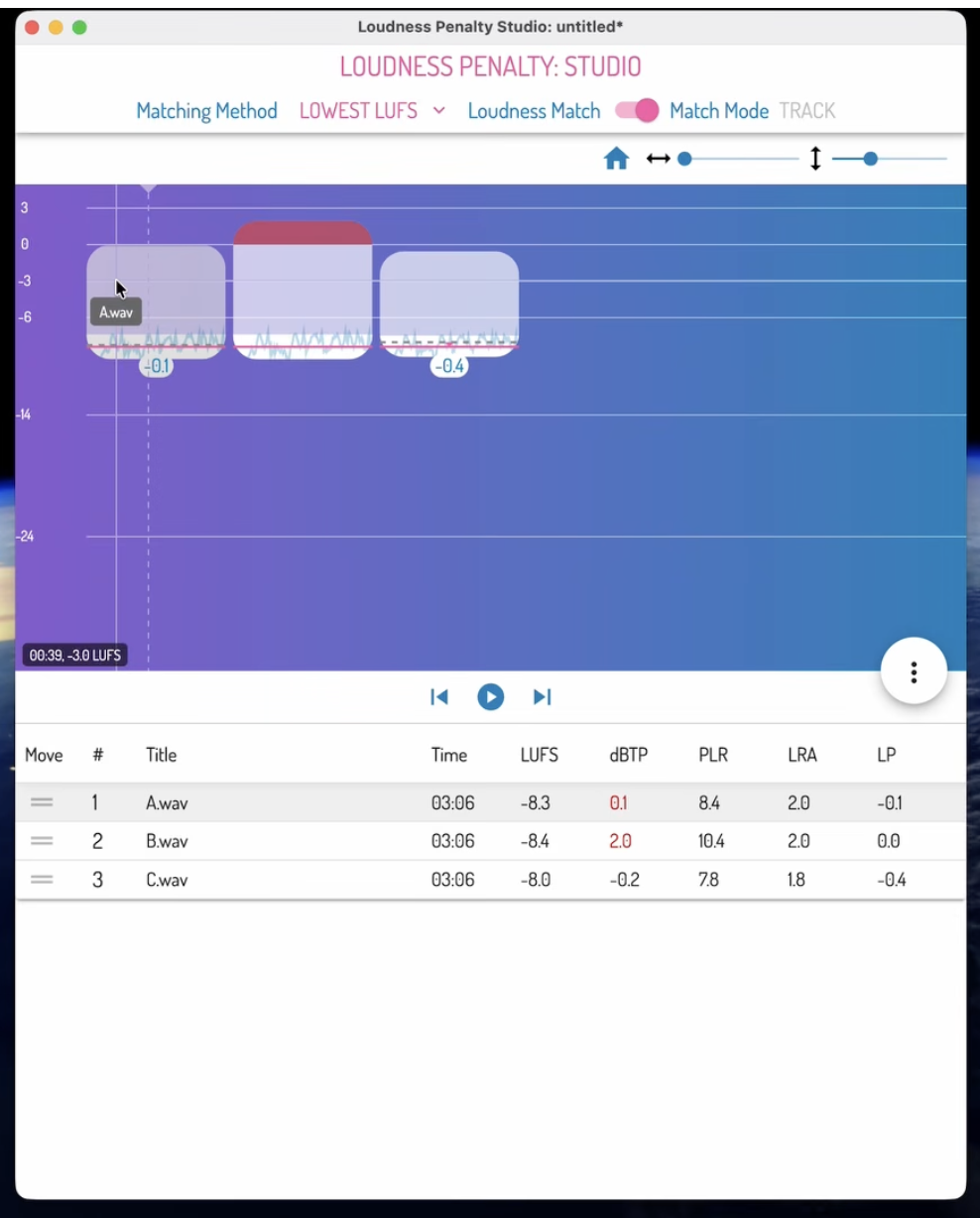
All three landed within about half a dB of each other on loudness, which tells you every service is chasing the same target.
The true peak column is where they separate. Master C had no overs at all, so there is a true peak limiter in that chain. Master B was 2 dB over, which is a lot. I am not precious about true peak overs, and I think the fear around them is mostly overblown, but 2 dB is more than I would send out.
One number to be careful with. Loudness Penalty also reports PLR, and it gave Master B the highest figure of the three at 10.4, against 8.4 and 7.8. Read quickly, that says B is the most dynamic master. It is not. PLR is just true peak minus loudness, so B’s 2 dB of overs inflate it. A meter reading and a result are not the same thing.
The column that does mean something is loudness range, and Master C is the narrowest of the three at 1.8. Remember that when I get to what I actually heard.
What each one sounded like
B was my least favorite, immediately. It is brighter across the board and it sounds like brightness rather than detail. The first thing I heard was the hi-hat jumping out at me. It reads like somebody put a brightness filter over the whole song.
A and C were much closer. The difference between them is dynamics. C is squashed. The kick and the snare stop punching through the way they do on A. On a song like this that is a real cost, because the kick and snare are what make people move and feel it. That is the 1.8 from the meter showing up in the listening. It is a small gap on paper and a clear one in the room.
I picked A, for the dynamics and because it sounded more open.
The reveal
- A was mine.
- B was Waves Online Mastering.
- C was LANDR.
No shock that I picked my own. I have a sound I like and I made the thing.
What surprised me was LANDR. I expected it to be bad and it was not. The tonal balance was fine. It was a little plain, which is not automatically a criticism, but the dynamics had been flattened and that is where it lost the song.
Waves being the bright one makes a certain sense. It is a newer service and it leans on the old approach of brighter and louder.
If you want to hear it yourself and pick without knowing which is which, the full test is in the video.
My mastering chain on this song, plugin by plugin
Here is the part the AI services cannot show you: the reasoning. Every move below exists because of a specific problem in this specific song.
The main problem I was solving throughout: I wanted this master brighter, but the cymbals and parts of the vocal were already harsh. Brighter and harsher usually travel together. Most of the chain is me separating them.
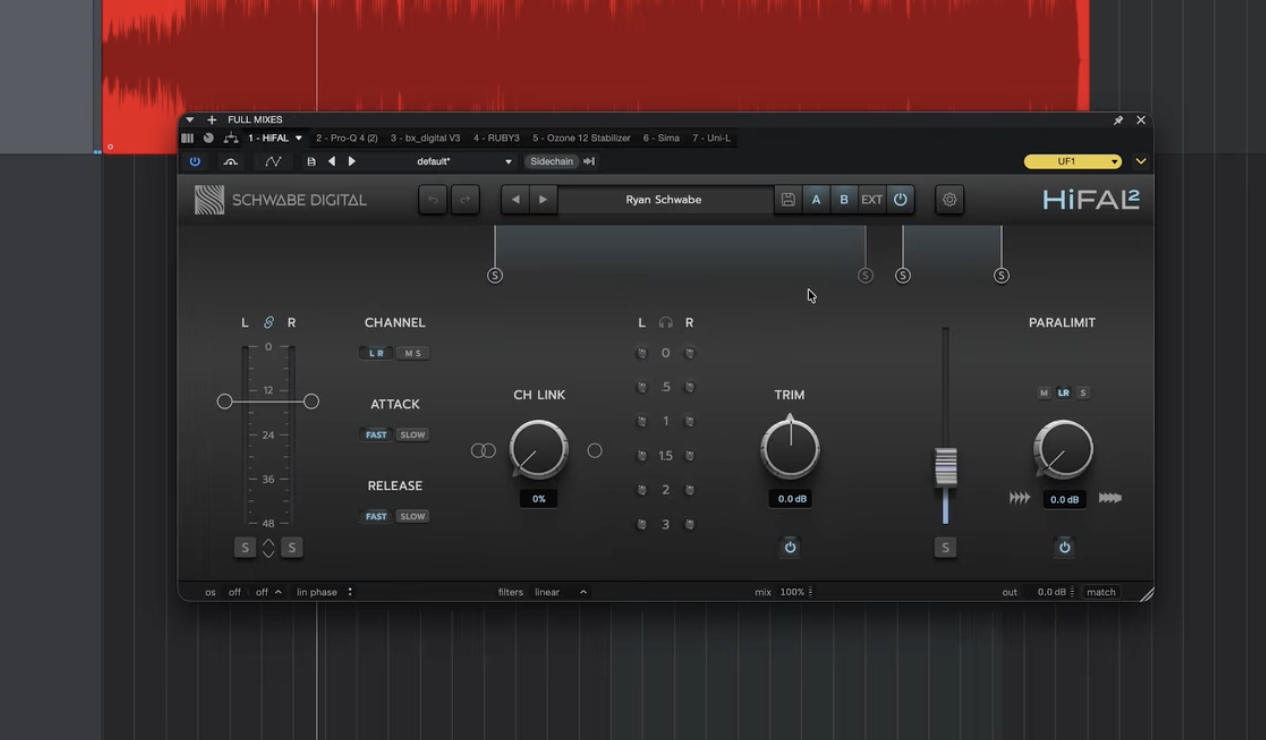
1. HiFal 2 by Schwabe Digital: take the harshness off the top
This is a pre-release version. It is good at pulling out the bright content that hurts your ears without dulling the whole record, and the Paralimit control adds a little of it back so you do not lose life. Solo the difference and you can hear exactly what is leaving.
I overdid it here on purpose. I knew I was going to bring brightness back later in the chain, so I cut deeper here than the final balance needed.
2. FabFilter Pro-Q 4: put the energy back where I want it
A small lift around 5 kHz to push the vocal forward. Bypass and re-engage it and you feel the vocal move up without the track getting harsh, because the harsh content is already gone.
3. Brainworx bx_digital V3: surgical notching
I have been using this one for about twenty years. This is resonance work: sweep a narrow boost until something ugly jumps out, then pull it down. The moves are small, negative 0.8, negative 0.6, negative 0.4. Solo the notches and you can hear the three nasty frequencies clearly.
There is also automation on this one. I widened the image slightly going into the chorus. This arrangement does not add many new instruments at the chorus, so the section needs help feeling like it opened up. That kind of decision is arrangement-aware, and it is the sort of thing nothing automated is going to do for you.
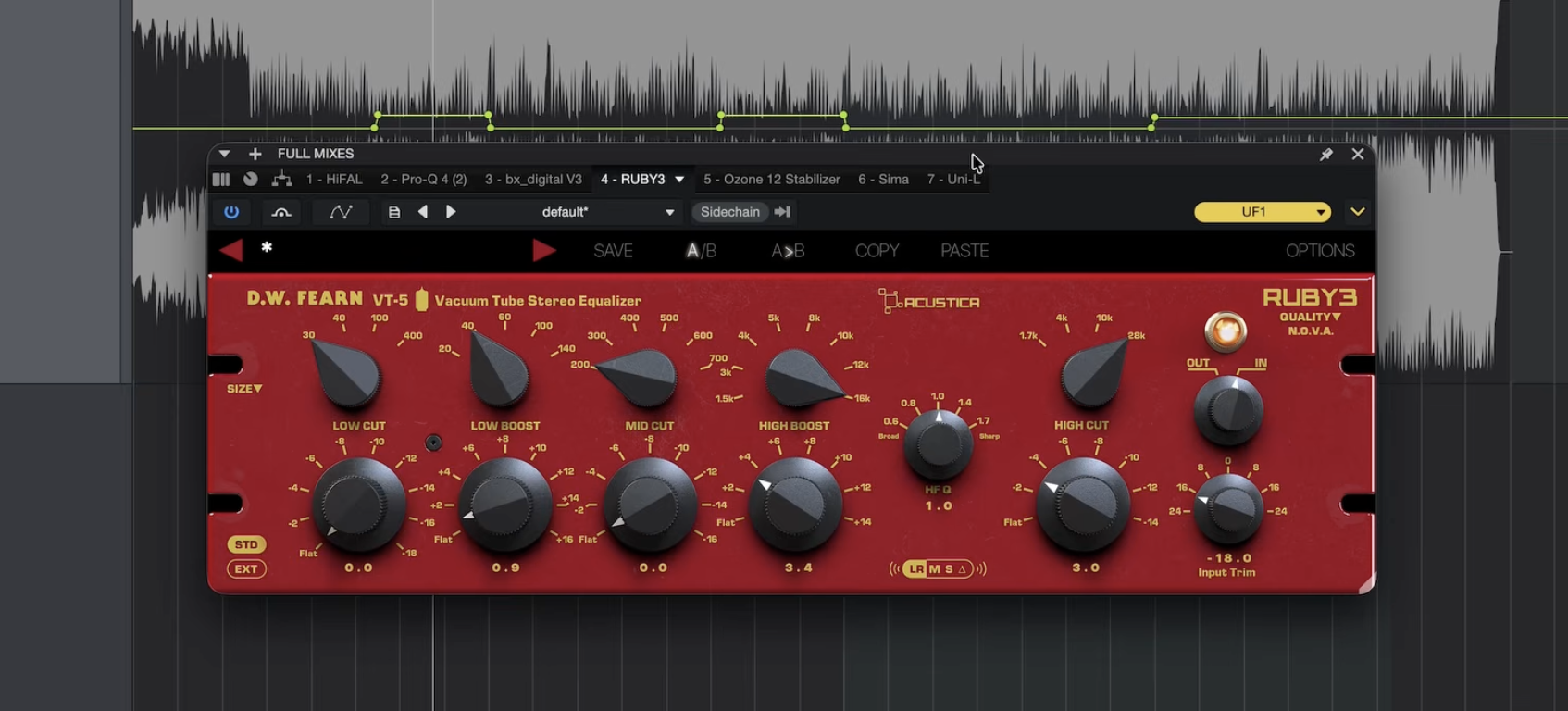
4. Acustica Ruby3: the trick that made it work
Ruby3 is Acustica’s take on the D.W. Fearn VT-5, a vacuum tube stereo equalizer. Big high shelf, plus 3.4, while pulling down the extreme top. Boosting one and cutting the other offsets the shelf and lets you get brightness in the range you want without dragging the air band up with it. Then I went back to HiFal and cut a little deeper still.
Something about this box gives a record that expensive sound. I cannot explain it better than that.
5. iZotope Ozone 12 Stabilizer: the safety net
Catches the resonances the manual notching missed and pushes them down. Hit delta and you hear exactly what it is pulling back. Same fight as everywhere else: brighter, not harsher.
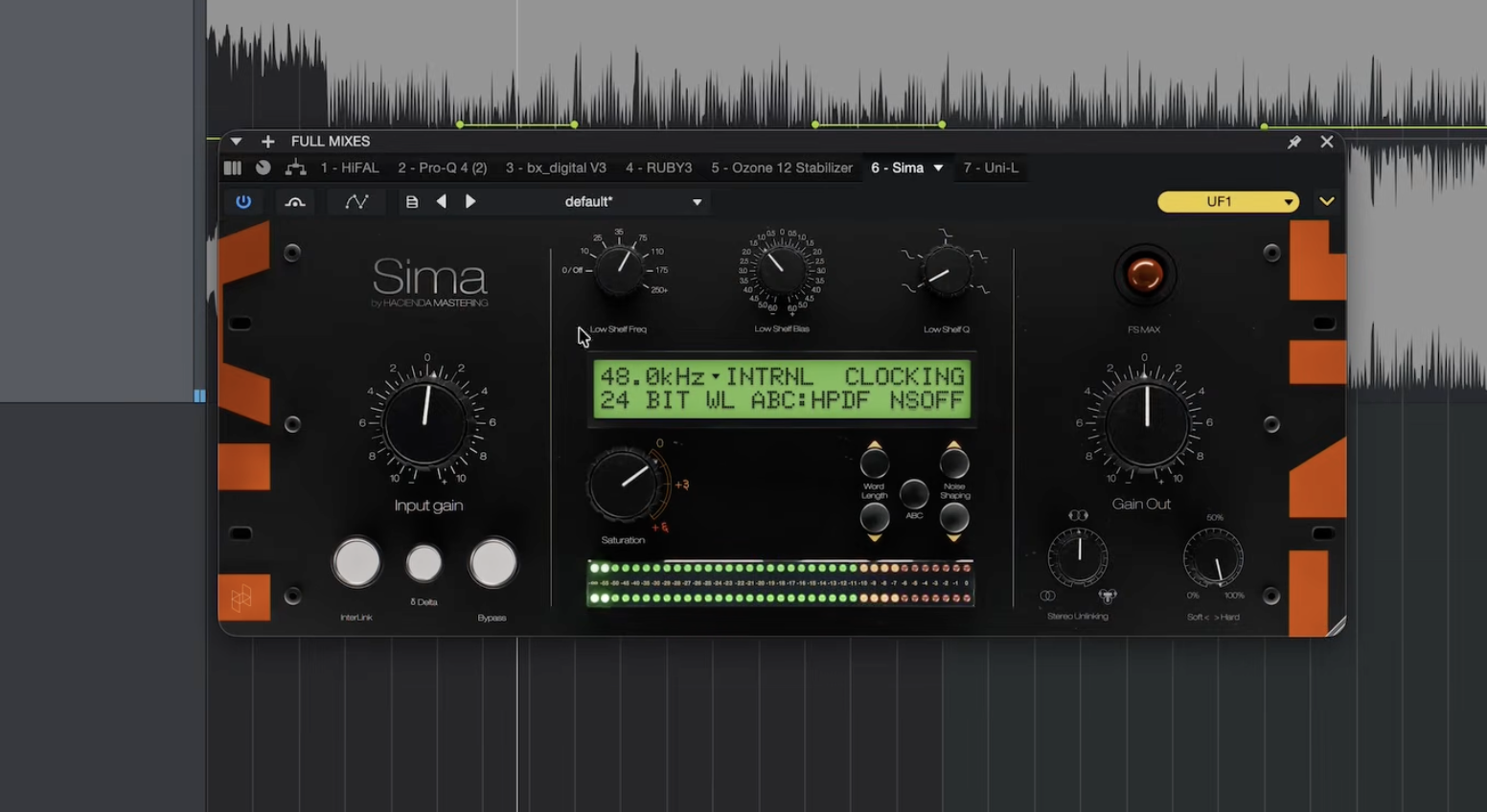
6. Sima by Hacienda Mastering: clipping and saturation
A recreation of a Lavry Gold converter. It clips for loudness and adds a nice saturation on the way.
The reason I reach for this one over the thousand other clippers is the low shelf bias. It reduces the low end going into the clipper and adds it back on the other side. The kick on this song hits hard, and straight into the clipper it was distorting. Dialing the bias back fixed it. I pulled the saturation back about 0.5 as well. This master is right on the edge of too much of it. I almost left the plugin out entirely.
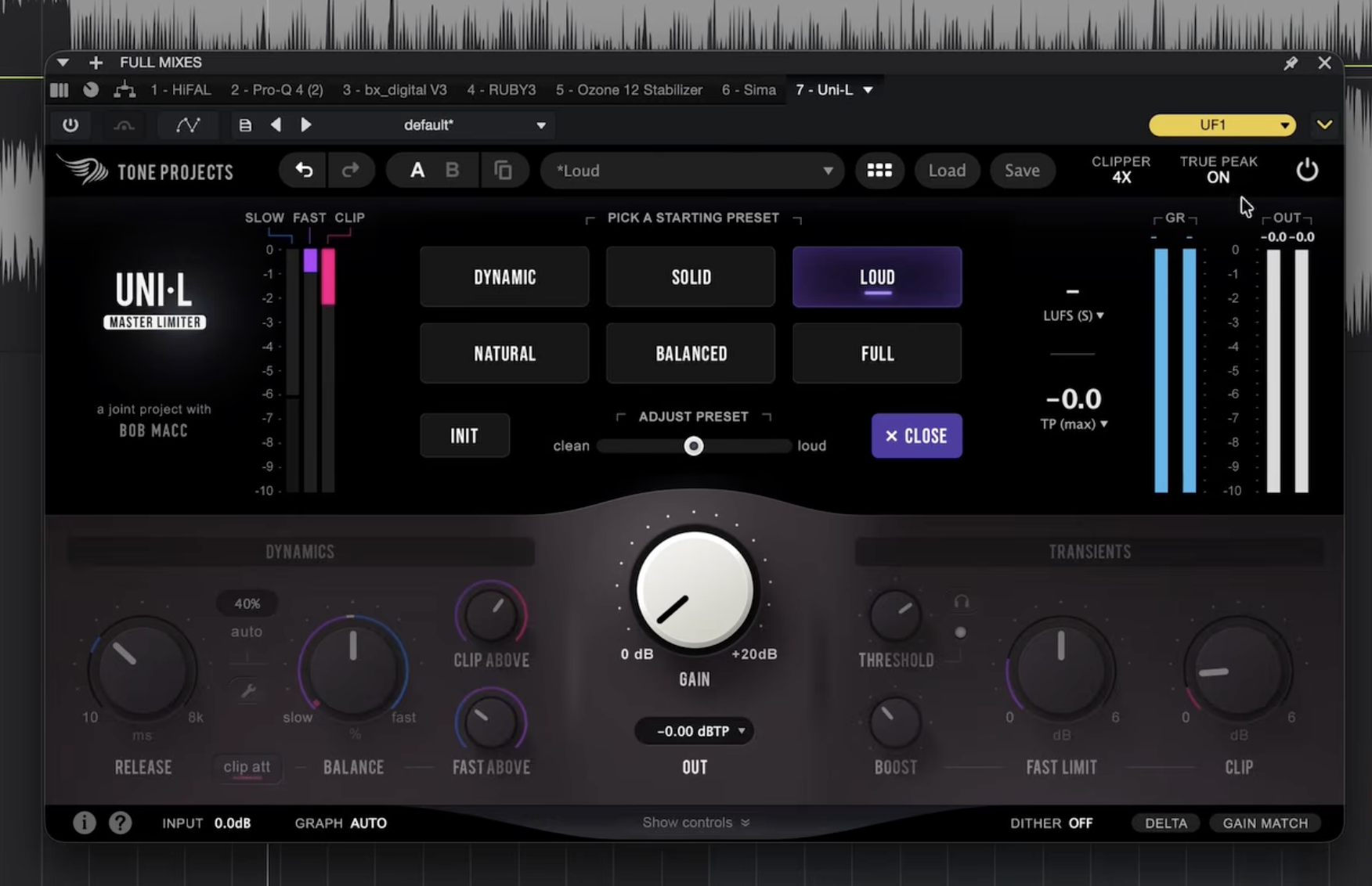
7. Tone Projects Uni-L: the final limiter
New to me, so I am still learning it. I started from its Loud preset and adjusted from there, which works more often than it should. Barely touching it, about 0.9 dB of reduction, just to get the last of the loudness. True peak limiting is on, and I am not usually a fan of true peak limiters, but this one sounds fine to me.
Why mastering automates better than mixing does
The result above is closer than I expected, and that is worth being honest about. Here is why.
Mastering works on a stereo file toward fairly standardized goals: loudness, tonal balance, format prep. There is one input and a narrow target. That is a tractable problem.
Mixing and mastering is not that. You are balancing 20 to 100 tracks where every decision changes five others. You EQ the vocal because of how it sits against the music. You compress differently because of what the performance is doing emotionally. You shape the low end because of how the kick and bass interact. Change one and the rest move.
Automated systems are good at isolated instructions. Make this brighter. Reduce this frequency. They are much worse at relationships between elements, which is most of what mixing actually is.
There is also an input problem. These systems learn from finished professional recordings. What actually gets uploaded is consumer microphones, untreated rooms, inconsistent gain staging, and the occasional clipped file. Knowing what a good vocal sounds like is not the same as knowing how to rescue a bad one.
Where AI mastering is genuinely worth using
I am not going to pretend it has no place. It is useful for:
- Rough references. Hearing roughly how your mix will translate once it is loud.
- Sharing work in progress. Sending collaborators something that is not a quiet rough.
- Learning. Run your mix through, then compare and work out what changed and why.
- Zero-budget projects. A mastered demo beats an unmastered one.
Where I would not use it is a release you actually care about. Not because the tonal balance will be wrong, but because of exactly what happened to LANDR in this test: the decisions that need to serve the song, like keeping the kick and snare punching on a track built to make people move, are the ones nobody automated is making for you. If the mix is already finished and you just need the last step done properly, that is mastering only.
Hear it on your own song
Reading about a blind test is not the same as running one.
Send me 60 seconds of your song. I will master a section free, and I will tell you honestly whether the mix is what is actually holding it back. Sometimes the answer is that your mix is fine and it just needs mastering. Sometimes it is not, and you should know that before you pay anybody.
Free Master
Send me 60 seconds. I will master it free.
A mastered section back, plus a straight note on whether the mix is what is limiting the song. No card, no sales call. 15 a month.
Send me 60 secondsFrequently asked questions about AI mixing and mastering
Can AI master a song as well as a human?
Closer than it used to be. In this blind, level-matched test against LANDR and Waves Online Mastering, both produced usable results. Waves came out noticeably brighter and LANDR flattened the dynamics, which cost the song its punch. For a demo or a reference, either is fine. For a release, the gap is in the musical decisions, not the tonal balance.
What is the best AI mastering service?
Of the two tested here, LANDR held up better. It has had over ten years of refinement and its tonal balance was reasonable. Its weakness was dynamic range. Waves Online Mastering leaned bright in a way that was immediately obvious on cymbals.
How much does AI mastering cost compared to a human engineer?
AI mastering typically runs $5 to $20 a track or a subscription. Professional mastering generally starts around $50 to $150. eMastered wanted $40 just to export a file for this test, which is why it is not in it.
Is AI mixing as good as AI mastering?
No, and it is not close. Mastering processes one stereo file toward standardized goals. Mixing requires balancing dozens of tracks where every decision affects the others. That interconnected judgment is the hard part, and it is where automated mixing still falls apart.
Does true peak matter?
Less than people think, but 2 dB of overs is more than I would send out. One of the three masters in this test had no overs at all, which means a true peak limiter is in that chain.